 Time
Time01
Check In
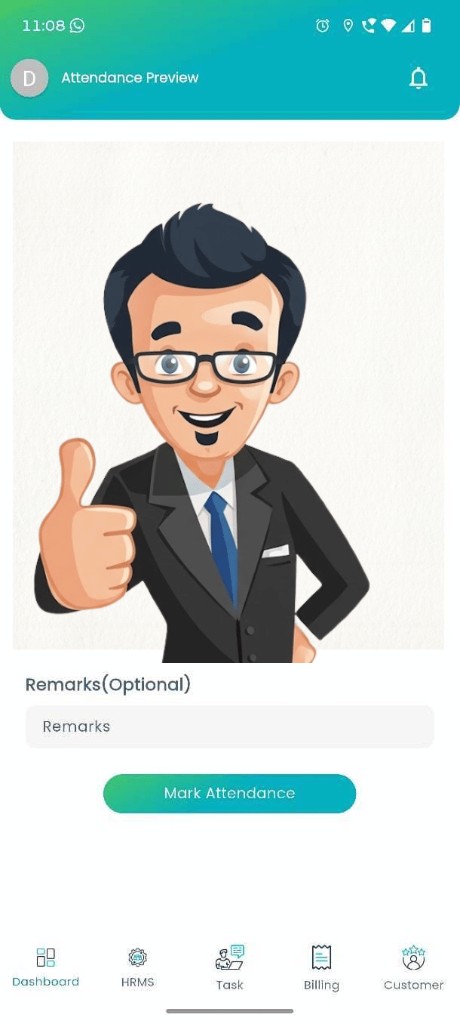
Top-bar Check In / Check Out marks presence for the day.
PresenceTimeERP Employee Monitoring connects My Attendance, Day Book, Timesheets and Task Management so managers track people and progress in the same workspace they already use.
| Employee | In Time | Out Time | Status |
|---|---|---|---|
| Tarun Gaur | 09:12 | 18:05 | P |
| Riya Sharma | 09:48 | 18:10 | Late In |
| Saurabh B. | 09:02 | 17:55 | P |
| Dev Aggarwal | A |
Why teams need this
If presence lives in one sheet and tasks live in another, managers keep chasing updates. TimeERP keeps both in HRMS.
10-second explainer
Real TimeERP screens, looping in 10 seconds: presence, attendance, tasks and approvals.
01 Presence
Know who’s present todayCheck In / Check Out and attendance from the same TimeERP mobile workflows your team already uses.
TimeERP command view
A product-style preview using the same module language managers already see in HRMS, Tasks and Reports.
Full Day / Half Day / Leave Count style summary (demo chart).
| Name | Dept | Work Hours | Tasks |
|---|---|---|---|
| Tarun Gaur | Sales | 8.8h | Processing |
| Riya Sharma | Ops | 8.3h | Open |
| Saurabh B. | Projects | 7.9h | Under Review |
How monitoring works in TimeERP
The same path your team already follows inside the product, made visible for managers.
Top-bar Check In / Check Out marks presence for the day.
PresenceP, A, Late In and Work Hours in one attendance view.
HRMSToday Task, notes and daily context beside attendance.
Day BookHours logged against real work, not idle scores.
HoursOpen → Processing → Under Review → Completed.
BoardHRMS, Employee and Task reports for weekly review.
ReportsInside the TimeERP product
Each tab reflects screens and labels that exist in TimeERP, not generic spyware features.
Managers and employees use the same attendance language: Present, Absent, Holiday, On Duty, Comp Off, plus Late In and Work Hours.
| Date | In Time | Out Time | Late In | Work Hours | Status |
|---|---|---|---|---|---|
| 07 Sep | 09:12 | 18:05 | 0 | 8.8 | P |
| 06 Sep | 09:48 | 18:10 | 18m | 8.3 | Late In |
| 05 Sep | A |
One place for the working day: tasks, notes, attendance and operational reminders.
Logged hours sit beside attendance and tasks so monitoring means utilization, not screenshots.
Know what’s moving with TimeERP’s real board statuses, not invented activity scores.
Review check-in exceptions before they become month-end surprises.
| Employee | Request | Status |
|---|---|---|
| Aastha Tyagi | Pending CheckIn | Pending |
| Monu Kumar | Late In correction | Pending |
| Khushi C. | CheckIn update | Approved |
Use TimeERP Reports for Employee, HRMS and Task views. The monitoring trail ends in decisions.
Attendance · Leave · Work hours
Product surface
Detailed Attendance + Attendance Summary
| Employee | Department | Designation | Status |
|---|---|---|---|
| Riya Sharma | Operations | Ops Lead | Active |
| Tarun Gaur | Sales | Executive | Active |
Pending CheckIn queue
Role-based access to workforce data
Management signals
Signals grounded in attendance approvals, Day Book overdue tasks and review queues.
Attendance Approval
Today Task · Overdue
Attendance Summary
Task Management board
Kanban · Stuck
Day Book dashboard
View Employee
HRMS View Employee brings department, designation, present days, leave balance and pending work into one profile managers already use.
My Attendance · Present / Late In / Absent
Task Management board statuses
Hours logged against work in TimeERP
Who uses it
Owners open Dashboard, HRMS and Reports (not five chat threads) to understand presence and progress.
Managers use Day Book overdue counts and Task Management statuses to unblock work early.
HR works Pending CheckIn queues, leave and View Employee without rebuilding Excel.
| Queue | Count |
|---|---|
| Pending CheckIn | 3 |
| Late In (week) | 8 |
| Leave Count | 11 |
Employees see My Attendance, Timesheet, My Leave and assigned tasks, with monitoring without a black box.
Responsible monitoring
TimeERP does not position employee monitoring as screenshots, keylogging or URL spying. It connects attendance and work already captured in HRMS.
Employees use My Attendance, Timesheet and tasks, the same system managers review.
Presence is read with Day Book tasks and board status, not idle scores.
Set Designation controls who can access workforce modules.
Managers act on Pending CheckIn, overdue tasks and Under Review queues.
Real Estate
Site visits and lead follow-ups live on the Task Management board while My Attendance shows who is available to move deals.
Construction
Coordinate office and project staff with Check In, Attendance Summary and Project Management tasks, without claiming GPS tracking.
| Employee | In Time | Status |
|---|---|---|
| Site team A | 08:55 | P |
| Site team B | 09:20 | Late In |
MSME
Smaller teams get My Attendance, Day Book and Tasks in one TimeERP login: the monitoring stack they can actually run daily.
Before & after
Daily brief
One morning view of presence, pending approvals and task pressure, before the inbox takes over.
Managers open this picture first: who’s present, what’s overdue, and which CheckIn requests need action.
Connected platform
Attendance and tasks are more useful when they connect to the same TimeERP modules your team already runs.
My Attendance · Day Book · Timesheet · Task Management
One login. One workforce picture. No separate monitoring tool to maintain.
Product tour
Mark presence and see TOTAL / PENDING / OVERDUE tasks for today.
In Time, Out Time, Late In and Work Hours, with Attendance Approval when needed.
| Date | In Time | Out Time | Late In | Status |
|---|---|---|---|---|
| 07 Sep | 09:12 | 18:05 | 0 | P |
| 06 Sep | 09:48 | 18:10 | 18m | Late In |
Open → Processing → Under Review → Completed, with owners and due dates visible.
Employee, HRMS and Task reports for weekly management reviews.
Employee · HRMS · Task reports
Outcomes
Task owners and attendance statuses in one login.
Pending CheckIn handled before payroll week.
Stuck and Under Review surfaces early.
P / A / Late In without spreadsheet rebuilds.
HRMS linked to Projects, CRM and Documents.
My Attendance and tasks visible to the individual.
From the TimeERP homepage
“From attendance to payroll to project tracking, everything in one place. Best decision for our construction company.”Construction Co., Ghaziabad
FAQ
Ready for a clearer workday
See My Attendance, Day Book, Tasks and Reports working together. Book a walkthrough with our team.